
Collaborate
Write together in real time, with individual cursors and undo history. Discuss a passage where it sits in the text, or talk in the project chat.

A full-featured collaborative writing platform with support for multiple file formats. LibrePaper is open source. You can use it for free at librepaper.org or host your own.
HTML LaTeX Typst Markdown Quarto Calepin
Write together in real time, with individual cursors and undo history. Discuss a passage where it sits in the text, or talk in the project chat.

Record edits as tracked changes, then accept or reject each one. You see who made each change and in which file, and each person turns tracking on or off for their own edits.

LibrePaper keeps every project's history. Name the versions that matter, compare any two, and restore an earlier one; the current text is saved first.

LibrePaper records who wrote every passage, whether a collaborator or an AI agent. Open the Authors tab in History to see each person's share of a file and the text in their colour.
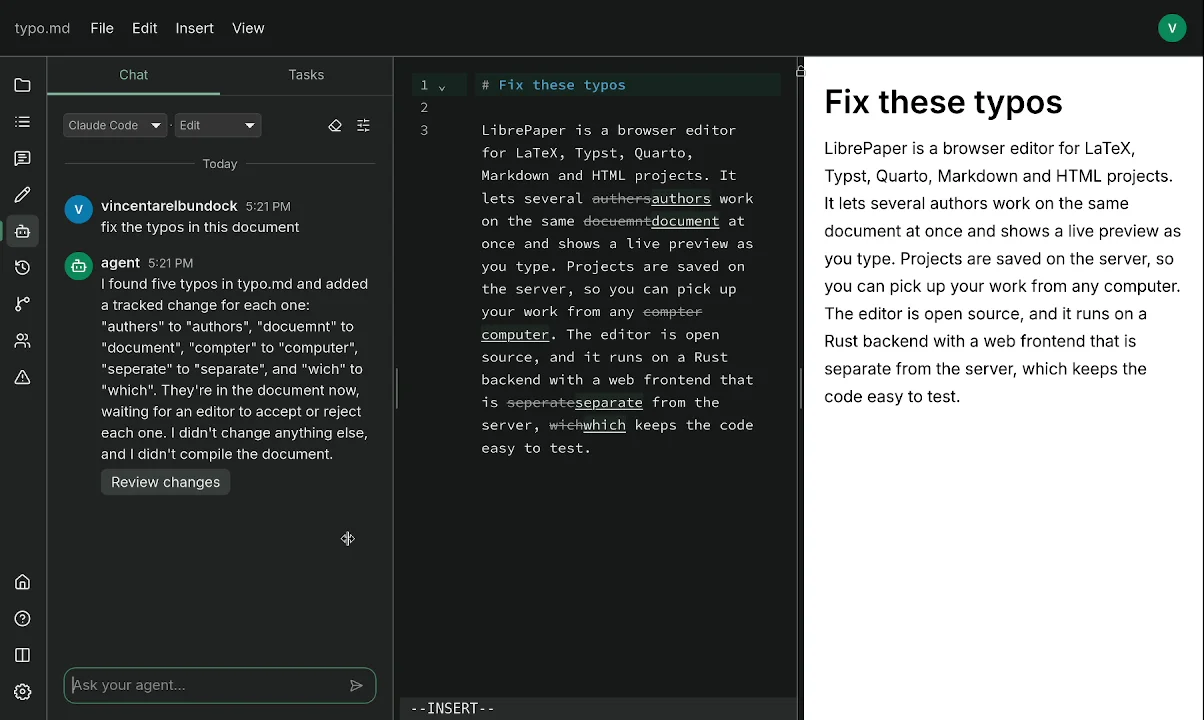
The desktop app starts the AI agent you already use, such as Claude Code, Codex, Pi or opencode. Your API keys stay with you, not on LibrePaper's servers.

Connect a project to a Git repository from the desktop app, and get or send changes in either direction. Works with GitHub or any Git host, from your computer or through a GitHub Action.

Select text in the preview and comment on it. Collaborators reply in a thread beside the document, and you resolve the thread when it is settled.

Write a task list in Markdown and turn on visual mode to see each task with a checkbox, priority, dates, people and tags. The file stays plain Markdown that any editor can read.
Writing, previews, collaboration and review all work in any modern web browser.
The desktop app uses the same account and the same projects. It adds what a browser cannot do on its own, such as running code, starting your AI agent, reading your Zotero library and backing up projects to your disk.
The desktop app runs on macOS, Windows and Linux.

| Feature | Browser | Desktop |
|---|---|---|
| Writing | ||
| Formats: LaTeX, Markdown, Typst | Yes | Yes |
| Computational notebooks: Quarto, Calepin | No | Yes |
| Multi-file projects | Yes | Yes |
| Templates | Yes | Yes |
| Autocompletion | Yes | Yes |
| Symbol and math palettes | Yes | Yes |
| To-do lists in Markdown | Yes | Yes |
| Vim and Emacs keybindings | Yes | Yes |
| Themes and dark mode | Yes | Yes |
| BibTeX | Yes | Yes |
| Zotero | No | Yes |
| DOCX from Markdown with Pandoc | No | Yes |
| Collaboration and review | ||
| Several people editing at once | Yes | Yes |
| Comment threads | Yes | Yes |
| Track changes | Yes | Yes |
| Chat | Yes | Yes |
| Share links | Yes | Yes |
| Version history | Yes | Yes |
| Tags and favorites | Yes | Yes |
| AI agents | ||
| Claude Code, Codex, Pi, opencode | No | Yes |
| Agent comments and tracked changes | No | Yes |
| Files and backups | ||
| Download projects | Yes | Yes |
| Git: two CLI commands and a GitHub Action; nothing to install for web coauthors | Yes | Yes |
| Local backups | No | Yes |
Sign in and create your first project. It costs nothing.
