
Write and review together.
A full-featured collaborative writing platform with support for multiple file formats. LibrePaper is open source. You can use it for free at librepaper.org or host your own.
HTML LaTeX Typst Markdown Quarto Calepin
- Free to use at librepaper.org
- Open source and self-hostable
- Multiple formats .tex .typ .md .qmd .html
- Collaborate and chat in real time
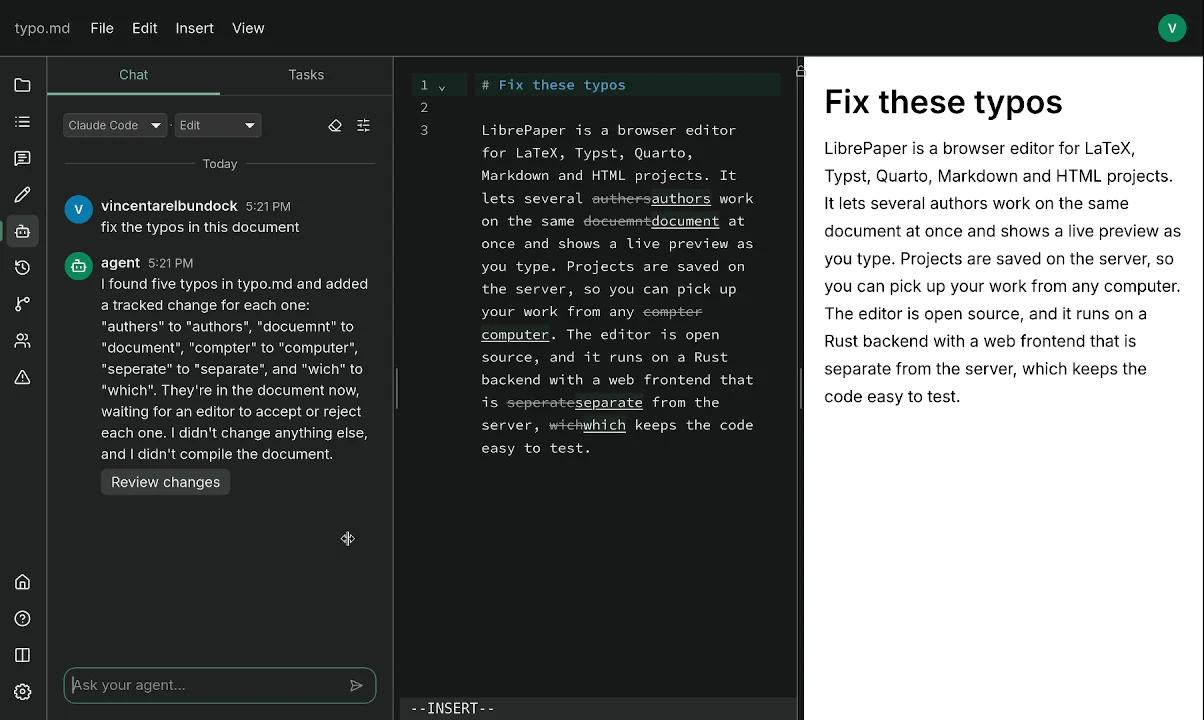
- Review and comment with track changes
- Bring your own AI. No new subscription.
Collaborate
Write together in real time, with individual cursors and undo history. Discuss a passage where it sits in the text, or talk in the project chat.
- Comment on a passage and discuss it in a thread.
- Talk with collaborators in the project chat.
- Share a link that lets someone read, comment or edit.

Review changes and history
Record edits as tracked changes and decide on each one.
LibrePaper keeps the history of every project. Pick a day on the calendar, open any saved version, compare it with another, and restore it if you need to. Name the versions that matter so you can find them again.
- See who made each change and in which file.
- Accept or reject changes one at a time.
- Compare versions to see what changed.
- Restore an earlier version. The current text is saved first.
- Download a version, or copy a link to it.

Work with AI
Bring your own AI agent into your writing. The desktop app starts the coding agent you already use, such as Claude Code, Codex, Pi or opencode, and gives it tools to read your document, comment on it and propose tracked changes.
Your API keys stay with you, not on LibrePaper's servers. No model runs on the LibrePaper server, and you need no additional subscription.
- Select a passage to run a writing or review task.
- Ask for changes in the sidebar chat.
- Decide whether an agent may read, comment or edit.
- Accept or reject every change an agent proposes.
Free and open source
Free to use
Every feature of LibrePaper is free. The public service at librepaper.org gives each account a fixed amount of storage.
Open source
The source code is released under the MIT License. Anyone can read it, change it and run it.
Your files
Download any project as ordinary files. The desktop app can back up every project to your disk.
In the browser or on your desktop
Writing, previews, collaboration and review all work in any modern web browser.
The desktop app uses the same account and the same projects. It adds what a browser cannot do on its own, such as running code, starting your AI agent, reading your Zotero library and backing up projects to your disk.
The desktop app runs on macOS, Windows and Linux.
- Runs R, Python and Julia code in Quarto and Calepin notebooks.
- Starts the AI agent you already use.
- Reads your Zotero library.
- Backs up every project to your disk.

Features
| Feature | Browser | Desktop |
|---|---|---|
| Writing | ||
| Formats: LaTeX, Markdown, Typst | Yes | Yes |
| Computational notebooks: Quarto, Calepin | No | Yes |
| Multi-file projects | Yes | Yes |
| Templates | Yes | Yes |
| Autocompletion | Yes | Yes |
| Symbol and math palettes | Yes | Yes |
| Vim and Emacs keybindings | Yes | Yes |
| Themes and dark mode | Yes | Yes |
| BibTeX | Yes | Yes |
| Zotero | No | Yes |
| DOCX from Markdown with Pandoc | No | Yes |
| Collaboration and review | ||
| Several people editing at once | Yes | Yes |
| Comment threads | Yes | Yes |
| Track changes | Yes | Yes |
| Chat | Yes | Yes |
| Share links | Yes | Yes |
| Version history | Yes | Yes |
| Tags and favorites | Yes | Yes |
| AI agents | ||
| Claude Code, Codex, Pi, opencode | No | Yes |
| Agent comments and tracked changes | No | Yes |
| Files and backups | ||
| Download projects | Yes | Yes |
| Git: two CLI commands and a GitHub Action; nothing to install for web coauthors | Yes | Yes |
| Project folder on disk | No | Yes |
| Local backups | No | Yes |
Start writing
Sign in and create your first project. It costs nothing.
